- 1 day
- 90€
- 3 days
- 180€
- 7 days
- 315€
Prices exclude 24% VAT
Create your order!
Add the products you want to rent and fill in the dates. We will contact you to confirm availability.
Priority order applies!
- CATEGORIES
- MONITORING
- MONITOR TYPE
- WIRELESS MONITORS
- Brand
- SMALLHD
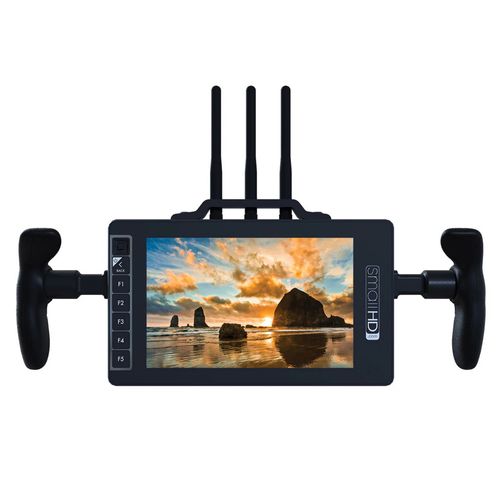
Combining a wireless video receiver and high-quality HD monitor, the SmallHD 703 Bolt 7" Wireless Monitor is an all-in-one director's monitor solution. Borrowing the wireless technology from Teradek, the 703 Bolt can receive uncompressed HD wireless signals from Bolt 500, 1000, or 3000 transmitters up to 300' away with no perceptible latency. With this feature, anyone can walk around the set while monitoring a camera feed, perfect for directors and camera assistants. Furthermore, despite the presence of a wireless receiver, the 703 Bolt maintains a slim profile similar to on-camera monitors.
- 703 Bolt 7" Wireless 1080p Monitor
- Works with Teradek Bolt 500/1000/3000
- 3000 cd/m² High Brightness
- 3G-SDI Input/Output; HDMI Output
- Dual L-Series Battery Plate
- Sun Hood
- Matte Screen Protector
- 12 & 24" Thin BNC Cables
A unibody aluminum exterior keeps the monitor durable yet lightweight, while also acting as a heatsink for the internal electronics. The LCD panel itself is protected by a layer of optically-bonded Gorilla Glass, notable for its transparency and toughness. The optical bonding process ensures that blacks are not washed out and reduces the harshness of reflections.
On the sides of the display is the SDI I/O. Having dual SDI ports allows for A/B viewing of two different SDI signals, or the secondary port can be assigned as an output for sending an SDI signal downstream to another monitor, switcher, or wireless accessory. All the functionality of the monitor is available via the PageBuilder OS, which provides advanced functionality with a simple and efficient graphical user interface.
PageBuilder OS
PageBuilder OS is an intuitive graphical user interface (GUI) that puts all the advanced functionality of the 703 Bolt at your fingertips. Rather than have confusing menus, this GUI allows you to selectively apply monitoring tools such as waveform, vectorscope, multiview, LUTs, and focusing aids on different "pages". These pages can be easily flipped through using the joystick. The buttons on the front panel can also toggle monitoring tools on and off for each page.
ColorFlow 3D LUT Processing
To keep your images consistent from production through to post-production, ColorFlow allows you to import 3D LUTs and display the treated image side-by-side with the untreated image to correctly gauge exposure while visualizing what is being recorded by the camera. Separate LUT-treated images can be sent downstream over SDI so you can have the 703 Bolt display a log image or LUT-treated image, while the director or client monitors connected to the outputs can receive images treated with a different LUT. An image capture function saves a still frame from the incoming video stream onto an SD card, and records the applied 3D LUT for post-production reference.
On-Set Problem Solving
PageBuilder OS has a dedicated "Output Preview" page which allows you to apply LUTs and other image adjustments specific to the output signal from the monitor. Whether you have your camera connected to the wireless or SDI inputs on the 703 Bolt, you are not limited by that connection; the 703 Bolt cross-converts to ensure compatibility with downstream hardware.
HD Scopes
Fill the screen with up to three simultaneous scopes, including waveform, vectorscope, and histogram, while still being able to observe the camera feed.
Exposure Tools
Exposure Assist supports both ARRI and Spectrum-based false color, with built-in IRE guides for reference. Utilize 2x Zebra to warn you when reaching a brightness level of your choosing. This is great for matching exposure across shots and cameras.
Customizable Focus Assist and Peaking Tools
As recording resolutions increase, so does the importance of focusing precision. With Focus Assist, you can highlight the areas that are in focus with a bright color. These highlights are easily visible on the fly for quick focus confirmation. Focus Peaking increases the sharpness of the image for a subtler focus confirmation without the need for bright outlines. The color and intensity of these tools are adjustable to fit your preference.
Versatile Frame Guides
Select standard markers and safety areas can be overlaid on the display as lines or matte overlays, with custom opacity level and colors. Default aspect ratios include 4:3, 1.85, 2.39:1, 16:9, and Custom (user-selectable).
Display
| Panel Type | IPS-Type LCD |
|---|---|
| Display Size | 7.0" / 17.8 cm |
| Screen Resolution | 1920 x 1080 |
| Aspect Ratio | 16:9 |
| Viewing Angle | Horizontal: 160° |
| Maximum Brightness | 3000 nits / cd/m2 |
| Contrast Ratio | 1150:1 |
| Bit Depth / Color Support | 8-Bit (16.7 Million Colors) |
| Pixels Per Inch (ppi) | 323 ppi |
| Color Gamut | 70% NTSC |
| Image Controls | Blue Only, False Color, Focus Peaking, Image Flip, Pixel-to-Pixel Zoom, RGB Parade, Screen Markers, Waveform |
I/O
| Video | 1 x BNC (3G-SDI) Input/Output 1 x HDMI Type A Output 1 x BNC (3G-SDI) Input |
|---|---|
| Embedded Audio | SDI Wireless |
| Audio I/O | 1x 1/8" / 3.5 mm Headphone Output |
| Built-In Speaker | No |
| Power I/O | 1x LEMO 2-Pin Input |
| Other I/O | 1x Wireless Receiver |
| Card Slot | 1 x SD |
Format Support
| Video Format | SDI (10-Bit 4:2:2 YCC) 1080p: 23.98/24/25/29.97/30/50/59.94/60 1080PsF: 23.98/24/25/29.97/30 1080i: 50/59.94/60 720p: 23.98/24/25/29.97/30/50/59.94/60 576i 480i Wireless (10-Bit 4:2:2) 1080p: 23.98/24/25/29.97/30/50/59.94/60 1080PsF: 23.98/24/25/29.97/30 1080i: 50/59.94/60 720p: 50/59.94/60 576i 480i |
|---|
Power
| DC Input Power | 6 to 34 VDC |
|---|---|
| Battery Type | No |
| Power Consumption | 16 W |
Mounting
| Mounting | 4x 1/4"-20 Female |
|---|
Environmental
| Certifications | CE, FCC, RoHS, as per Manufacturer |
|---|---|
| Operating Temperature | 0 to 100°F / -18 to 38°C |
| Storage Temperature | -4 to 120°F / -20 to 48.9°C |
General
| Weight | 2.8 lb / 1.25 kg, Including |
|---|